Invoice automation can reduce rekeying and approval chasing for a UK finance team, but it needs clear stopping points. Use it to prepare and route supplier bills while people retain responsibility for exceptions, spending approval and payment release. This workflow shows where to draw those boundaries before connecting your accounts.
By ObvioTech Editorial. Desk research checked 18 October 2026. Product features below come from supplier documentation; we have not tested these services. The workflow and examples are proposed controls, not observed customer results.
Table of Contents
The Short Version
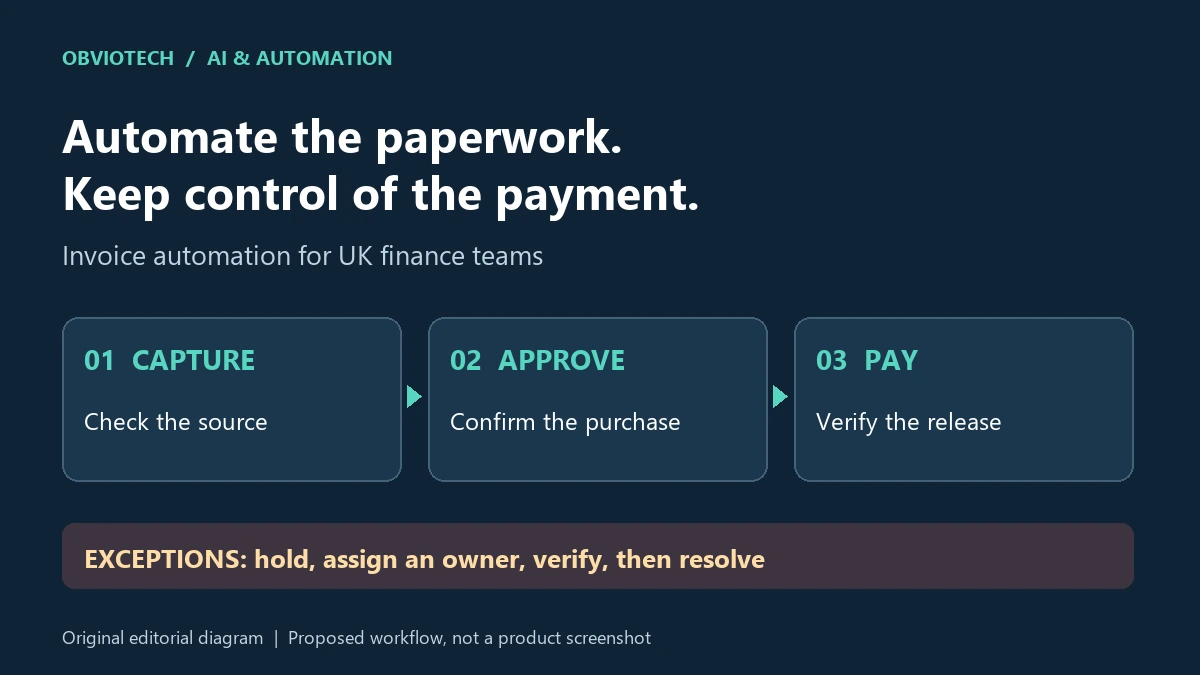
The safest starting scope for invoice automation is capture, suggested coding and routing for review. Treat an extracted amount as a draft value, an approved bill as permission to record a liability, and payment release as a separate decision. A single green status should never stand in for all three.
ObvioTech recommendation: keep a named owner for every rejected, duplicate or uncertain item. Before expanding the pilot, ask someone outside the setup team to trace an invoice from the original document through approval to the ledger and payment record. If they cannot explain a status change, fix the handover first.
What This Actually Means for UK Businesses
Optical character recognition, or OCR, reads fields from an image or PDF. Rules or AI can then suggest categories and route the bill.
Structured e-invoicing is different: HMRC describes direct exchange between financial systems. Its consultation outcome, updated on 26 November 2025, announces mandatory e-invoicing for VAT invoices from 2029. That is preparation context, not a new October 2026 law or proof that every implementation detail is settled.
The immediate requirement is sound records. HMRC’s VAT records guidance requires invoices received and applicable digital records; where separate software maintains those VAT records and submits returns, the required links must be digital. An extracted tax figure is not evidence that the invoice is valid or that VAT is reclaimable. Agree document retention, corrections and tax treatment with your accountant.
Buying a capture tool therefore addresses only part of the process. Write down which system holds the supplier record, which person accepts the purchase and which route releases funds. That map makes a small automation useful without disguising an unresolved finance control.
Real-World Applications
Illustrative UK consultancy: supplier bills enter a controlled inbox, the system proposes a project code, and a project manager checks that the work was delivered. Finance checks the supplier and tax fields before posting. A disputed fee stays in an exception queue rather than moving forward because the document was readable.
Illustrative multi-site business: route a maintenance bill to the relevant site manager, then apply the agreed spending authority. If the manager is absent, use a recorded delegate with the right authority. Do not let a reminder deadline silently approve the purchase. These are design examples, not companies we interviewed or deployments we tested.
If an integration platform moves attachments or sends reminders, review retry behaviour as carefully as the successful path. Our Make and Zapier workflow comparison explains platform trade-offs; it does not establish that either product supplies your invoice controls. A repeated delivery should be identifiable as the same event, not a fresh bill.
A five-step invoice automation control map
Use this proposed sequence as a review agenda. Assign an owner and an evidence record at each step, including the route for an item that cannot proceed. Keep the original invoice accessible alongside corrected fields so a later reviewer can understand what changed and why.
- Receive and identify: record the supplier, document reference and arrival route. Flag possible duplicates across inbox, upload and integration paths; require review before discarding a suspected repeat.
- Extract and check: compare the proposed supplier, currency, net amount, VAT and total with the original. Route unreadable fields, inconsistent totals and missing purchase references to a person.
- Approve the purchase: have the accountable budget holder confirm the goods or services and spending authority. Define how a material change after approval invalidates or renews that approval.
- Post and authorise payment: record the bill only through the agreed route, then separately check the payee, amount and payment authority. Limit who can change supplier bank details and who can release funds.
- Reconcile and retain: match the resulting payment to the bill and ledger. Keep unresolved failures visible, with an owner and next action, rather than treating submission as proof of settlement.
For a concrete product distinction, Dext’s payment-run documentation supports staged and conditional approvals, but separates approval from submission. Submission requires sufficient wallet funds and Strong Customer Authentication. Changes to a workflow apply to future runs, not runs already in progress. Our recommendation is to inspect open runs when changing an authority rule; do not assume they inherited it.
What to Watch Out For
The critical invoice automation risk is a route that avoids the control you thought was universal. Dext’s ApprovalMax connection guide documents approval before posting to Xero or QuickBooks Online, but also direct paid-item paths.
In Xero, the Bank destination bypasses ApprovalMax, and an allocated bank-linked payment method can post an invoice as paid. In QuickBooks Online, Cash, Check and Credit Card destinations bypass it. The same connection excludes credit notes/refunds and sales items.
Illustrative exception: an otherwise familiar supplier invoice contains changed bank details. Hold payment, assign finance to verify the change through an established supplier contact, and record who checked it. The budget holder’s confirmation that the work was delivered does not verify the payee. Do not release a held item merely to clear an ageing queue.
Invoices may contain personal information, including sole-trader details. Ask where files, backups and support access are located; UK data residency alone does not answer who can access them. The ICO’s international-transfer guide covers making personal information accessible to a separate overseas organisation as well as sending it. Where its restricted-transfer conditions apply, an appropriate transfer mechanism is needed.
For an AI component, document its purpose, lawful basis where personal data is involved, access controls and supplier processing terms, including any reuse for model training. Use ICO guidance on AI and data protection to frame accountability and accuracy questions; the ICO flags that guidance as under review following the Data (Use and Access) Act 2025. Obtain specialist advice for your deployment. This article is general workflow guidance, not tax or legal advice.
Getting Started
Start an invoice automation pilot with a bounded supplier group and retain the existing approval route as a fallback. Use our practical UK pilot checklist to record the baseline, workload and review effort. Count the time spent correcting and chasing exceptions as well as the time spent entering bills.
Before any live payment capability is connected, rehearse a duplicate, unreadable total, missing approver, rejected bill, changed payee and interrupted sync using sanitised records in a safe test environment. These are proposed acceptance cases, not tests ObvioTech performed. Establish whether a retry resumes the same item and whether a rejection is visible in every relevant system.
Agree the stop conditions in advance. Keep the pilot on hold if a rejected item can reach payment, a record loses its supporting document or nobody owns a failed handoff. Expand only when the finance lead can explain the results and restore the previous workflow. No universal accuracy threshold or saving is established by this research.
Tools Worth Considering
For a UK shortlist, Dext documents a capture-and-coding route through ApprovalMax to Xero or QuickBooks Online. Its 2 February 2026 Payments announcement establishes the earlier UK Xero launch; current help pages, rather than that historical rollout plan, describe present scope. This is an evidenced connection to investigate, not a product endorsement or a claim that all destinations enforce approval.
Choose the accounting destination before comparing the surrounding invoice automation stack. Our Xero and QuickBooks UK comparison provides plan context. Ask suppliers to demonstrate your exact unpaid-bill, paid-item and exception routes, and confirm current UK plan eligibility and the combined software, integration and payment charges. This workflow guide quotes no prices and declares no winner.
FAQ
Can the software approve every readable invoice?
Readability is a capture check, not a spending decision. Define which items require a budget holder, which exceptions finance must resolve and who can authorise payment. Review a supplier’s bypass routes before relying on an approval label.
Is scanning a PDF the same as e-invoicing?
No. Reading a PDF extracts information from a document. Structured e-invoicing exchanges invoice data between systems. Neither removes the need to resolve disputed purchases or retain the appropriate evidence.
What should the team do next?
Map one representative bill and one exception through the proposed process. Record the owner, evidence and stopping rule at each handoff, then use those records as the acceptance agenda for a supplier demonstration.